> For the complete documentation index, see [llms.txt](https://help.wayment.net/llms.txt). Markdown versions of documentation pages are available by appending `.md` to page URLs; this page is available as [Markdown](https://help.wayment.net/instrukcii-po-oplate/kak-oplatit-netflix.md).
# Как оплатить Netflix
Как оплатить Netflix из России в 2026: пошаговая оплата подписки картой Wayment.
{% hint style="danger" %}
Для оплаты Netflix потребуется создать новый аккаунт с регионом Сингапур и валютой оплаты SGD.
{% endhint %}
В этой инструкции показано, как создать аккаунт Netflix, выбрать тариф и оплатить подписку с помощью виртуальной карты Wayment.
{% stepper %}
{% step %}
## Проверьте подключение к VPN
Откройте [2ip.ru](https://2ip.ru/) и убедитесь, что отображаемая страна соответствует выбранной локации VPN.

{% endstep %}
{% step %}
## Начните регистрацию
Откройте сайт Netflix, введите действующий адрес зарубежной электронной почты, например Gmail, и нажмите **Get Started**.

Netflix предложит отправить ссылку для продолжения регистрации. Нажмите **Send Link**.

{% endstep %}
{% step %}
## Подтвердите электронную почту
Откройте письмо от Netflix и нажмите **Create your account**.

Ссылка из письма может быть доступна ограниченное время, поэтому лучше продолжить регистрацию сразу после её получения.
{% endstep %}
{% step %}
## Перейдите к выбору тарифа
На открывшейся странице нажмите **Finish sign-up**.

Затем нажмите **Next**.

{% endstep %}
{% step %}
## Выберите тариф
Выберите подходящий план Netflix и нажмите **Next**.

Перед продолжением проверьте ежемесячную стоимость, качество видео и количество устройств, поддерживаемых выбранным тарифом.
{% endstep %}
{% step %}
## Выберите способ оплаты
На странице оплаты выберите **Credit or Debit Card**.

{% endstep %}
{% step %}
## Введите реквизиты карты Wayment
Откройте [@WaymentBot](https://t.me/WaymentBot) и нажмите на приобретённую карту.
Скопируйте:
* номер карты;
* срок действия;
* CVV-код.
В поле **Name on card** рекомендуется указать свои имя и фамилию латиницей.
{% hint style="warning" %}
Не передавайте номер карты, CVV-код и коды подтверждения другим людям.
{% endhint %}
{% endstep %}
{% step %}
## Подтвердите подписку
Вернитесь на страницу Netflix и внесите данные карты в соответствующие поля.
Проверьте выбранный тариф и стоимость, поставьте отметку о согласии с условиями и нажмите **Start paid membership**.

{% endstep %}
{% step %}
## Проверьте результат
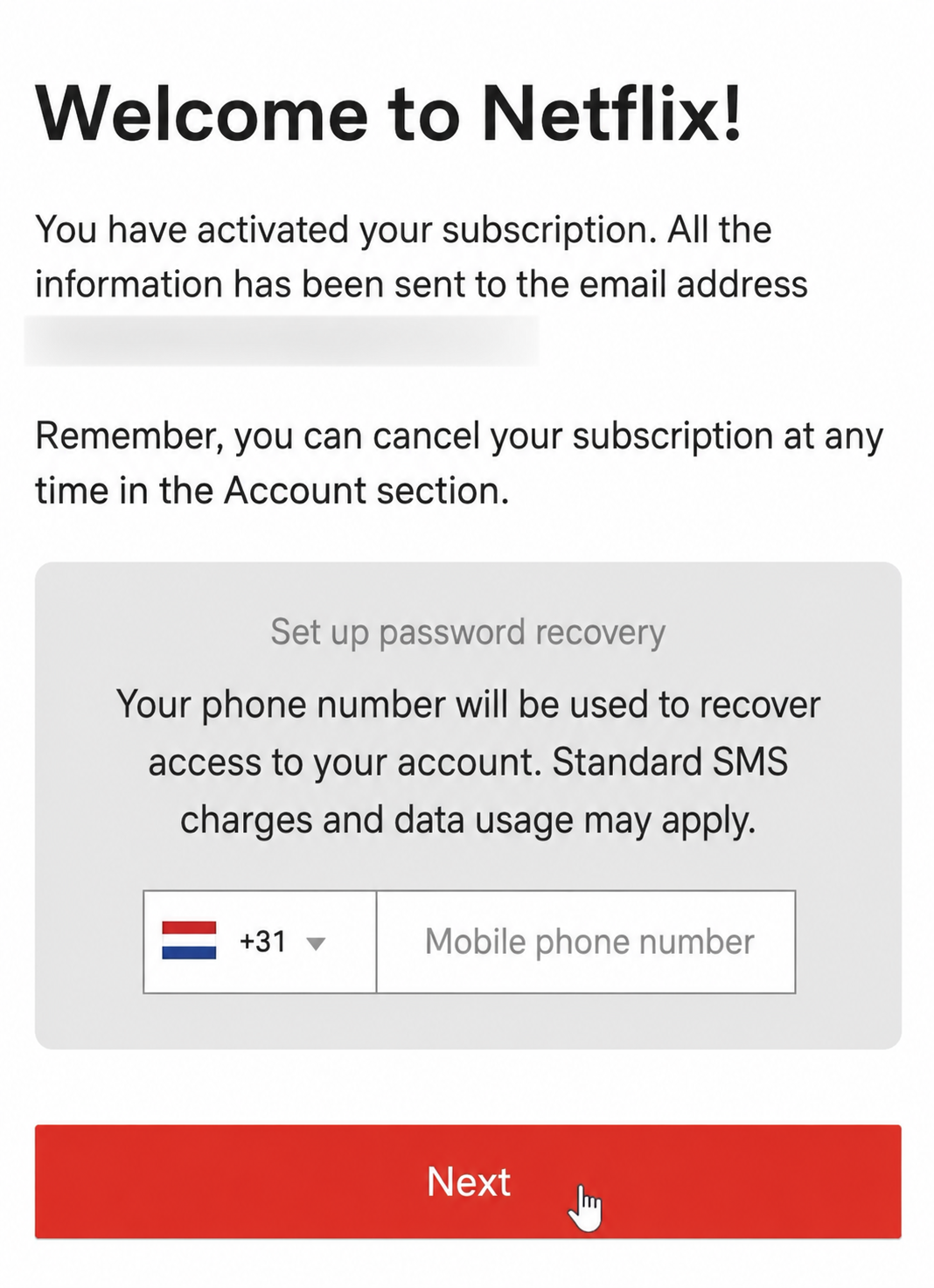
После успешной оплаты появится сообщение **Welcome to Netflix**.
Номер телефона для восстановления доступа можно не указывать и пропустить этот шаг.
{% hint style="success" %}
Готово — подписка Netflix активирована.
{% endhint %}
Интерфейс Netflix может обновляться, поэтому названия и расположение отдельных элементов иногда отличаются от скриншотов.
{% endstep %}
{% endstepper %}
---
# Agent Instructions
This documentation is published with GitBook. GitBook is the documentation platform designed so that both humans and AI agents can read, navigate, and reason over technical content effectively. Learn more at gitbook.com.
## Querying This Documentation
If you need additional information that is not directly available in this page, you can query the documentation by asking a question.
Perform an HTTP GET request on the following URL with the `ask` and `goal` query parameters:
```
GET https://help.wayment.net/instrukcii-po-oplate/kak-oplatit-netflix.md?ask=&goal=
```
`ask` is the immediate question: it should be specific, self-contained, and written in natural language.
`goal` is what the user is ultimately trying to achieve, the reason they need the answer. Sharing it helps GitBook give you a better, more relevant answer. A goal is most helpful when it describes the outcome the user wants rather than restating the question. For example, with `ask=how do I create an API token`, a goal like `automate deployments from our CI pipeline` lets GitBook tailor the answer to that use case.
The response will contain a direct answer to the question and relevant excerpts and sources from the documentation.
Use this mechanism when the answer is not explicitly present in the current page, you need clarification or additional context, or you want to retrieve related documentation sections.


 {% hint style="success" %}
Готово — подписка Netflix активирована.
{% endhint %}
Интерфейс Netflix может обновляться, поэтому названия и расположение отдельных элементов иногда отличаются от скриншотов.
{% endstep %}
{% endstepper %}
---
# Agent Instructions
This documentation is published with GitBook. GitBook is the documentation platform designed so that both humans and AI agents can read, navigate, and reason over technical content effectively. Learn more at gitbook.com.
## Querying This Documentation
If you need additional information that is not directly available in this page, you can query the documentation by asking a question.
Perform an HTTP GET request on the following URL with the `ask` and `goal` query parameters:
```
GET https://help.wayment.net/instrukcii-po-oplate/kak-oplatit-netflix.md?ask=
{% hint style="success" %}
Готово — подписка Netflix активирована.
{% endhint %}
Интерфейс Netflix может обновляться, поэтому названия и расположение отдельных элементов иногда отличаются от скриншотов.
{% endstep %}
{% endstepper %}
---
# Agent Instructions
This documentation is published with GitBook. GitBook is the documentation platform designed so that both humans and AI agents can read, navigate, and reason over technical content effectively. Learn more at gitbook.com.
## Querying This Documentation
If you need additional information that is not directly available in this page, you can query the documentation by asking a question.
Perform an HTTP GET request on the following URL with the `ask` and `goal` query parameters:
```
GET https://help.wayment.net/instrukcii-po-oplate/kak-oplatit-netflix.md?ask=